Random Things

Posts on anything and everything

Labels

Airlines Amazon Auto Electronics Entertainment Faith FB Finance Fix Things Food Gaming Geography Google HaHa's Health Information Mac Microsoft Military Movies Music News Personal Photography Politics Recalls Reviews Riddle Science Security SM Space Sports Tech Terms Thoughts Tools Travel Trivia Videos VR World News

Saturday, September 15, 2018

Live Stream Games

How to Live Stream Games on YouTube
ANTHONY HEDDINGS 


YouTube’s live streaming support has gotten much better and is now a solid competitor to Twitch. If you’re an aspiring content creator with an audience on YouTube, you might want to live stream on a platform where you’re already established instead of splitting your viewer base.

Step One: Install OBS

OBS is a streaming and recording program that’s popular with live streams. It captures your game’s output and then streams it to YouTube or Twitch. OBS is pretty simple to set up but comes with a lot of advanced settings you can configure.
Generally, you’ll get a decent performance hit running recording software at the same time as your game. If you have a low-end system, you might not be able to stream effectively, though you can adjust the settings and quality of the recorder to match your needs.

Step Two: Grab Your Steam Key and Set Up OBS

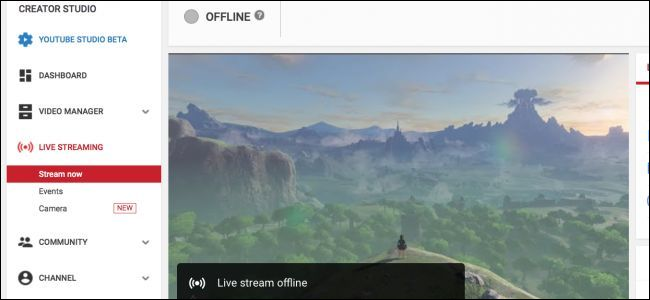
Right-click your avatar in the top right corner of the YouTube’s settings and then select “Creator Studio.” You’ll find your stream key in the  “Live Streaming” section under “Encoder Setup.”
Open up OBS, and have it start the auto-configuration wizard. Once it gets to the “Stream Information” pane, change from Twitch to YouTube and then paste in the stream key from YouTube’s settings.
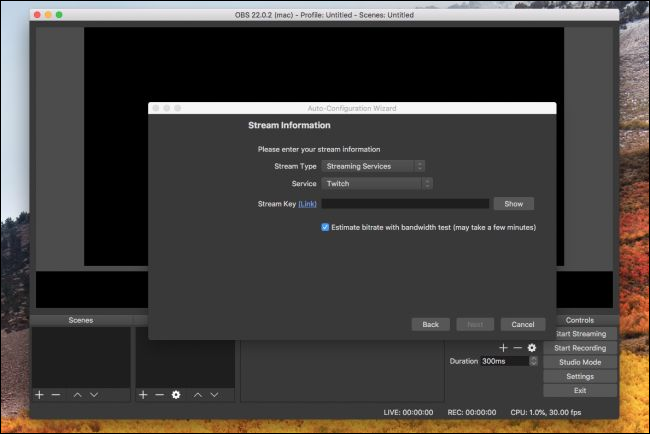
This stream key must be kept secret, as anyone with it can live stream on your channel. If your key does manage to get out, you can reset it from the YouTube dashboard.

Step Three: Set Up Your Stream Info

You’ll have to set up your stream info separately for every live stream. YouTube works a bit differently than Twitch when it comes to streaming. On Twitch, you just select the game you’re playing and set a stream title. On YouTube, live streams are the same as videos and need thumbnails, titles, descriptions, and all the metadata that goes into a regular video. You also have the option of making the live stream public, unlisted, or private, for testing out stream settings before going live.
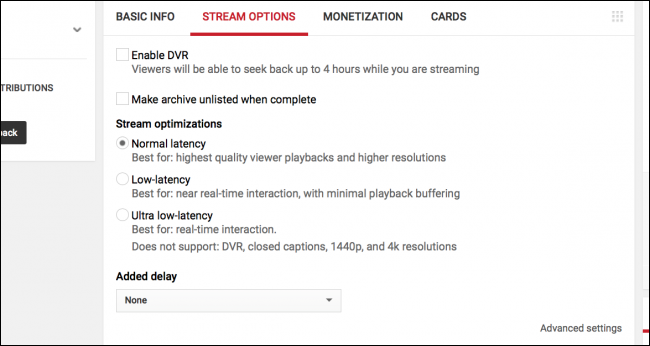
Under “Stream Options” you can enable or disable DVR, make the stream archive after you’re done, and choose your latency settings. You can also add a delay here if you have a problem with stream sniping.
Under “Advanced Settings” you can configure the chat options, including turning on slow mode and preventing non-members from chatting (YouTube’s form of Twitch subs).
From there, you can hit “Start Streaming” in OBS, and you should see that you’ve gone live in the YouTube dashboard.
If you’ve got monetization enabled on your YouTube account, you can enable ads on the stream and allow people to donate in chat. If you’ve got a second monitor, it’s a good idea to pop that dashboard over to it so you can monitor the stream and read chat at the same time.
Email ThisBlogThis!Share to XShare to FacebookShare to Pinterest

No comments:

Post a Comment

Newer Post Older Post Home
Subscribe to: Post Comments (Atom)

Facebook Badge

Jim White

Create Your Badge

Followers

Subscribe To Random Things

Posts
Atom
Posts
Comments
Atom
Comments

Blog Archive

  • ►  2019 (697)
    • ►  April (23)
    • ►  March (166)
    • ►  February (188)
    • ►  January (320)
  • ▼  2018 (4481)
    • ►  December (343)
    • ►  November (346)
    • ►  October (385)
    • ▼  September (373)
      • Large, Aggressive Mosquitoes
      • Rare Two-headed Snake
      • FB uses Your Contacts
      • Coke Eying New Drinks
      • 'Softer' Music in the Gym
      • Financial News
      • Calorie-Burning Car
      • 4K Roku
      • Present
      • Lessons from a Superhero
      • Stay Focused
      • Your Identity
      • Movie Review - Smallfoot
      • Oldest Bronze Sculpture
      • World News
      • Artificial Tire Reefs
      • More Legroom
      • Get Better Sleep
      • College Football
      • Comcast Wins Bid
      • Beetle Is Dead
      • 504 Gateway Timeout Error
      • Elbows & Ears
      • Pure
      • A Spiritual Workout
      • FB Hacked; 50M People
      • World’s Busiest Airlines
      • Hat Could Be Worth Nothing
      • Biker Gang President
      • Fire w/out Trigger
      • Double-Front-Wheel 
Motorcycle
      • Family as Seriously as Work
      • New vs. Used Smartphones
      • Office 2019
      • Your Pay Going Down
      • Solution to Riddle of the Week
      • Go Away
      • Today's Encouragement
      • Fri Devotional
      • Movie Review - Night School
      • Freshman Blunder
      • No More Passwords
      • Amazon 4-star
      • Fed's Raise Rates
      • Snapchat & Amazon
      • President's New Limo
      • Movie Preview - Night School
      • Kind of Giving
      • Today's Encouragement
      • Thur Devotional
      • Chrome & Android
      • 3K Cashierless Stores
      • Hydrogen-Powered Trains
      • Stressed Out?
      • Dunkin' Donuts Change
      • Entertainment News
      • Michael Kors Buys Versace
      • Movie Preview - Smallfoot
      • Do You Pray?
      • Today's Encouragement
      • Wed Devotional
      • Alexa vs. Google vs. Siri
      • Box That Traps Light
      • Keto Diet
      • SiriusXM to Buy Pandora
      • Weight Watchers Name Change
      • Stealthy, Robotic Tankers
      • Movie Preview - Hell Fest
      • Netflix Running Ads?
      • Wise People
      • Today's Encouragement
      • Tues Devotional
      • Donated Coke
      • Scrabble Adds New Words
      • Internet Split
      • Drone Shot Down Drone
      • Entertainment News
      • Riddle of the Week
      • Weekend Box Office Results
      • Pushing the Red Button
      • Today's Encouragement
      • Monday Devotional
      • Movie Review - Assassination Nation
      • PlayStation Classic
      • Airlines Raise Fees
      • Internet Meme's
      • Cities Are Paying People
      • Overpriced Items
      • Health News
      • Entertainment News
      • Lightning Bolts
      • Bubbles
      • Grow
      • What You Should Do
      • JD Power's Best Airports 2018
      • Financial News
      • Personality Types
      • Gas-Powered Bike Hyperloop
      • Weekend in Las Vegas
      • Wild Electric Futuremobile
    • ►  August (386)
    • ►  July (385)
    • ►  June (359)
    • ►  May (378)
    • ►  April (384)
    • ►  March (396)
    • ►  February (353)
    • ►  January (393)
  • ►  2017 (4506)
    • ►  December (389)
    • ►  November (382)
    • ►  October (399)
    • ►  September (368)
    • ►  August (406)
    • ►  July (386)
    • ►  June (378)
    • ►  May (383)
    • ►  April (354)
    • ►  March (374)
    • ►  February (337)
    • ►  January (350)
  • ►  2016 (3443)
    • ►  December (353)
    • ►  November (360)
    • ►  October (365)
    • ►  September (338)
    • ►  August (329)
    • ►  July (331)
    • ►  June (332)
    • ►  May (356)
    • ►  April (342)
    • ►  March (316)
    • ►  February (21)

Who I B

Dubs
View my complete profile
Picture Window theme. Powered by Blogger.

Translate